第一时间捕获有价值的信号
本文深入探讨 Open vSwitch (OVS) 中 QoS 的应用与实现,涵盖入口流量控制 (ingress) 和出口流量整形 (egress) 策略。通过 Linux TC 工具和 OVS 配置,掌握 OVS 网络流量控制与限速的实践方法。
核心内容
本文主要介绍 Open vSwitch 中 QoS 的应用和实现方法。
QoS
对于控制一台机器的网络 QoS,分两个方向,一个是入方向,一个是出方向,能控制的一般只有出方向,通过 Shaping,将出的流量控制成自己想要的模样,而进入的方向是无法控制的(不过可以变通,通过 ingress qdisc 策略将入口流量重定向到虚拟网卡,然后对的 egress 进行出口限速,从而变通实现入口流控),只能通过 Policy 将包丢弃。
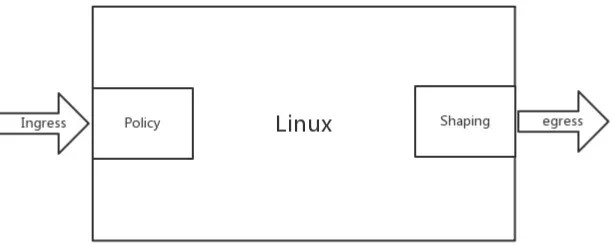
- Policy 通过简单的丢包机制实现入口流量(ingress)速率的限制,它既可以作用于物理接口,也可以作用于虚拟接口。
- Shaping 作用于接口上的出口流量(egress),可以实现多个 QoS 队列,不同队列里面处理不同策略。
控制策略
在 Linux 下,可以通过 TC(traffic control)控制网络的 QoS,主要就是通过队列的方式。
无类别排队规则(Classless Queuing Disciplines)
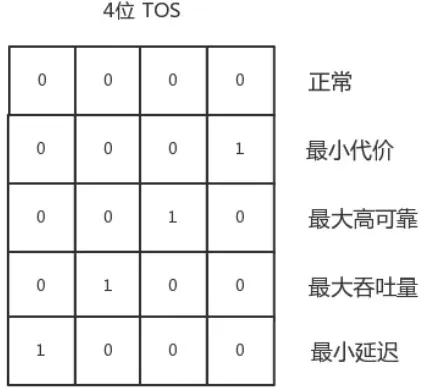
- 默认为 pfifo_fast,是一种不把网络包分类的一种技术。pfifo_fast 分为三个先入先出的队列,称为三个 Band,根据网络包里面 TOS,看这个包到底应该进入哪个队列。其中 Band 0,1,1 优先级依次降低。TOS 总共四位,每一位表示的意思不同,总共十六种类型,和 0 到 2 对应起来,表示不同的 TOS 对应的不同的队列。
$ tc qdisc show dev enp4s0
qdisc pfifo_fast 0: root refcnt 2 bands 3 priomap 1 2 2 2 1 2 0 0 1 1 1 1 1 1 1 1- 随机公平队列(Stochastic Fair Queuing) 会建立很多的 FIFO 队列,TCP Session 会计算 hash 值,通过 hash 值分配到某个队列。在队列的另一端,网络包会通过轮询策略从各个队列中取出发送,这样不会有一个 Session 占据所有的流量。如果两个 Session 的 hash 是一样的,会共享一个队列,也有可能互相影响。hash 函数会经常改变,从而不会总是相互影响。
- 令牌桶规则(TBF,Token Bucket Filte)
基于类别的队列规则(Classful Queuing Disciplines)
典型的为分层令牌桶规则( HTB , Hierarchical Token Bucket),下面的实验就采用这个方案。
OVS 中如何控制 QoS
QoS 功能的实现是在 Linux 内核中,OVS 只是能够配置部分 OVS 支持的 QoS 类型,如果需要一些不支持的 QoS 类型,可以通过 patch 来支持这些配置,也可以通过传统的 TC 工具直接进行 QoS 的策略配置。
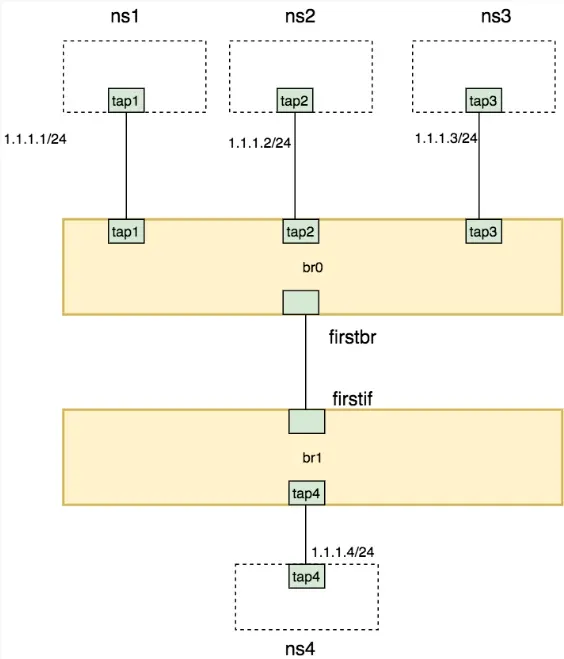
创建网络拓扑
ip netns add ns1
ip netns add ns2
ip netns add ns3
ip netns add ns4

ovs-vsctl add-br br0
ovs-vsctl add-br br1

ovs-vsctl add-port br0 tap1 -- set Interface tap1 type=internal
ip link set tap1 netns ns1
ip netns exec ns1 ip addr add 1.1.1.1/24 dev tap1
ip netns exec ns1 ip link set tap1 up
ip netns exec ns1 ip link set lo up

ovs-vsctl add-port br0 tap2 -- set Interface tap2 type=internal
ip link set tap2 netns ns2
ip netns exec ns2 ip addr add 1.1.1.2/24 dev tap2
ip netns exec ns2 ip link set tap2 up
ip netns exec ns2 ip link set lo up


ovs-vsctl add-port br0 tap3 -- set Interface tap3 type=internal
ip link set tap3 netns ns3
ip netns exec ns3 ip addr add 1.1.1.3/24 dev tap3
ip netns exec ns3 ip link set tap3 up
ip netns exec ns3 ip link set lo up

ip link add firstbr type veth peer name firstif

ovs-vsctl add-port br0 firstbr
ovs-vsctl add-port br1 firstif
ip link set firstbr up
ip link set firstif up

ovs-vsctl add-port br1 tap4 -- set Interface tap4 type=internal
ip link set tap4 netns ns4
ip netns exec ns4 ip addr add 1.1.1.4/24 dev tap4
ip netns exec ns4 ip link set tap4 up
ip netns exec ns4 ip link set lo up
ingress
对于进入的流量,可以设置 Ingress policy ingress_policing_rate:为接口最大收包速率,单位kbps,超过该速度的报文将被丢弃,默认值为0表示关闭该功能; ingress_policing_burst:为最大突发流量大小,单位kb。默认值0表示1000kb;这个参数最小值应不小于接口的 MTU,通常设置为ingress_policing_rate 的 10% 更有利于 tcp 实现全速率。
ovs-vsctl set Interface firstif ingress_policing_rate=1000000
ovs-vsctl set Interface firstif ingress_policing_burst=100000
ovs-vsctl list interface firstif
清除接口速率限制方法
ovs-vsctl set Interface firstif ingress_policing_rate=0
ovs-vsctl set Interface firstif ingress_policing_burst=0
ovs-vsctl list interface firstif
egress
首先,在 firstbr 端口上创建了一个 QoS 规则,对应三个 queue
ovs-vsctl set port firstbr qos=@newqos \
-- --id=@newqos create qos type=linux-htb other-config:max-rate=10000000 queues=0=@q0,1=@q1,2=@q2 \
-- --id=@q0 create queue other-config:min-rate=3000000 other-config:max-rate=10000000 \
-- --id=@q1 create queue other-config:min-rate=1000000 other-config:max-rate=10000000 \
-- --id=@q2 create queue other-config:min-rate=6000000 other-config:max-rate=10000000

ovs-vsctl list qos
ovs-vsctl list queue
查看 br0 中的端口信息(交换机对应的 dpid,以及每个端口的 OpenFlow 端口编号,端口名称,当前状态等等),进入 br0 的网络包,要通过设置流表规则,匹配后进入不同的队列。
ovs-ofctl show br0
ovs-ofctl add-flow br0 "in_port=1 nw_src=1.1.1.1 actions=enqueue:4:0"
ovs-ofctl add-flow br0 "in_port=2 nw_src=1.1.1.2 actions=enqueue:4:0"
ovs-ofctl add-flow br0 "in_port=3 nw_src=1.1.1.3 actions=enqueue:4:0"
ovs-ofctl dump-flows br0
测试验证
-
分别测试 ns1,ns2,ns3 到 ns4 的带宽时,每个都是能够打满带宽
$ ip netns exec ns4 iperf -s -i 1 $ ip netns exec ns1 iperf -c 1.1.1.4 -i 1 -t 30 ... [ ID] Interval Transfer Bandwidth [ 4] 0.0- 1.0 sec 1.14 MBytes 9.60 Mbits/sec [ 4] 1.0- 2.0 sec 1.14 MBytes 9.57 Mbits/sec [ 4] 2.0- 3.0 sec 1.14 MBytes 9.56 Mbits/sec ... -
如果 ns1 和 ns2 一起测试,发现带宽粗略比例为 3:1,但是占满了总的流量,没有发包的 ns3 有 60% 的带宽被借用了
$ ip netns exec ns4 iperf -s -i 1 $ ip netns exec ns1 iperf -c 1.1.1.4 -i 1 -t 30 $ ip netns exec ns2 iperf -c 1.1.1.4 -i 1 -t 30 ... [ 4] 16.0-17.0 sec 912 KBytes 7.47 Mbits/sec [ 5] 9.0-10.0 sec 250 KBytes 2.05 Mbits/sec ... -
在 ns1,ns2,ns3 中同时发包测试,发现是粗略( 10Mbps 限速的测试误差较大,可能是由于软件和网络环境问题引起,暂时忽略这些误差)按照 3:1:6 的比例进行的,正是配置的队列带宽比
$ ip netns exec ns4 iperf -s -i 1
$ ip netns exec ns1 iperf -c 1.1.1.4 -i 1 -t 30
$ ip netns exec ns2 iperf -c 1.1.1.4 -i 1 -t 30
$ ip netns exec ns3 iperf -c 1.1.1.4 -i 1 -t 30
...
[  6]  4.0- 5.0 sec   113 KBytes   927 Kbits/sec
[  5]  6.0- 7.0 sec   148 KBytes  1.22 Mbits/sec
[  4]  8.0- 9.0 sec   761 KBytes  6.23 Mbits/sec
[  6]  5.0- 6.0 sec   100 KBytes   822 Kbits/sec
[  5]  7.0- 8.0 sec   277 KBytes  2.27 Mbits/sec
[  4]  9.0-10.0 sec   792 KBytes  6.49 Mbits/sec
[  6]  6.0- 7.0 sec   197 KBytes  1.61 Mbits/sec
[  5]  8.0- 9.0 sec   342 KBytes  2.80 Mbits/sec
[  4] 10.0-11.0 sec   703 KBytes  5.76 Mbits/sec
...
清除实验环境
ip link del firstbr type veth peer name firstif
ovs-vsctl del-br br0
ovs-vsctl del-br br1
ip netns del ns1
ip netns del ns2
ip netns del ns3
ip netns del ns4

ovs-vsctl destroy qos qosID
ovs-vsctl destroy queue queueID
# 删除所有 qos 及 queue
ovs-vsctl -- --all destroy qos -- --all destroy queue
# 取消并删除qos一步达成
ovs-vsctl -- destroy qos port -- clear port port qos